Do residents’ old prox cards keep working after the swap?
Yes — the 125 kHz radio reads existing prox cards immediately, while new encrypted credentials and phone access are introduced in parallel. Nobody gets locked out on cutover day.
★ Brivo
Model B-BSPSF · SKU B-BSPSF-B
When a building migrates to Brivo, this reader keeps the old 125 kHz prox cards working alongside 13.56 MHz encrypted credentials and Mobile Pass phones. Available as B-BSPSF-B in black and B-BSPSF-W in white.
We install and repair access control systems across Chicago, the North Shore and the northwest suburbs — ask about the B-BSPSF for your building or business.
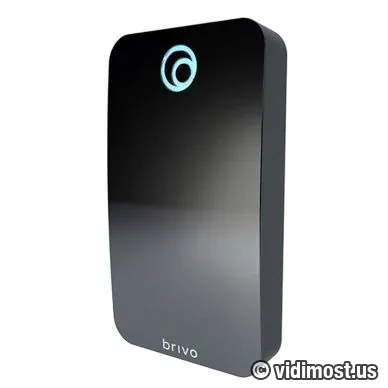
| Brand | Brivo |
|---|---|
| Dimensions | 144.8 x 82.5 x 20.3 mm (5.7 x 3.25 x 0.8 in) |
| Catalog category | Access Control Systems |
| Typical use | Security projects in Chicago North Shore – homes, small business and multifamily buildings, depending on how the system is designed. |
| How we use it | As part of complete systems (cameras, access control, intercoms, networking) rather than standalone online sales. |
Most access upgrades stall on one question: what happens to the two hundred prox cards residents already carry? With the B-BSPSF the answer is nothing, for now. It reads three credential types at once — legacy 125 kHz prox, encrypted 13.56 MHz smart cards and fobs, and phones over Bluetooth — so the swap to Brivo happens without a single resident locked out.
Specs, firmware notes and availability change over time — confirm against the manufacturer’s current documentation before ordering.
The 125 kHz prox card is the veteran of access control — and its weakness is the reason this reader exists. It broadcasts its number unencrypted, and copying one requires no special skill or equipment. The 13.56 MHz smart credentials that replace it are encrypted and mutually authenticated: reader and credential verify each other, and a cloned number gets nowhere.
A tri-technology reader carries the building through that transition: residents badge in with their existing 125 kHz cards on day one, while the building issues EV3 fobs and Mobile Pass invitations at whatever pace suits it. When the last legacy card is retired, the 125 kHz side simply goes unused — with no second hardware swap later.
Single-gang footprint, standard electrical box — the mounting that most legacy readers already occupy. On a typical Chicago takeover we de-energize the old unit, terminate the wiring on the B-BSPSF, and the door is running three credential technologies by lunch.
The rest is the standard Brivo hardware story: sealed for outdoor duty, LED and beeper on every read plus a Bluetooth indicator, mounting protected by a screw that only its special key will turn, and a 5-year warranty. OSDP to Brivo panels; Wiegand mode when a third-party controller stays in place — which on migrations is often the first phase before the panel swap.
Both part numbers — B-BSPSF-B in black and B-BSPSF-W in white — are the same device inside; pick the one that matches the door at $390 MSRP.
Yes — the 125 kHz radio reads existing prox cards immediately, while new encrypted credentials and phone access are introduced in parallel. Nobody gets locked out on cutover day.
They are encrypted and mutually authenticated. A 125 kHz prox card announces its number in the clear and is trivial to clone; a copied 13.56 MHz credential fails authentication.
Black versus white — that is the entire difference. Hardware, radios, warranty and the $390 MSRP match exactly.
When the building has no legacy 125 kHz cards to support — new construction or completed migrations. It costs less and reads the same modern credentials.
If you already have Brivo hardware on site and the system is unstable, we can audit it, fix urgent issues and plan upgrades step by step instead of forcing a complete replacement. This includes systems originally installed by other vendors.
We offer free estimates for projects in our service area. New service clients also receive a 50% discount on the first service visit for troubleshooting and diagnostics, including systems we did not install.
To move forward, go to the Contact page and mention model B-BSPSF in your message. You can also attach photos of your existing equipment, panels or racks to speed up the design and service process.


