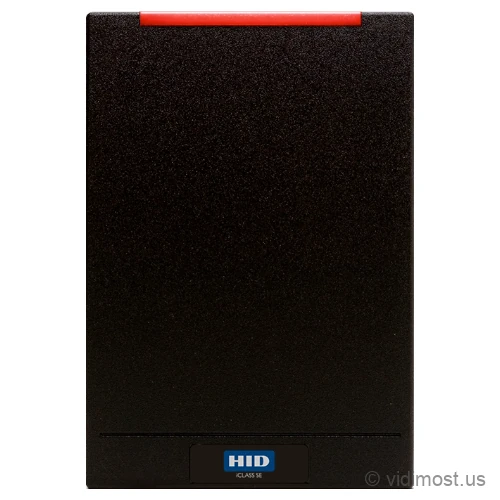
The HID multiCLASS SE RP40 is a single-gang wall reader from HID's multiCLASS SE family that reads both 125 kHz prox cards and 13.56 MHz smart cards in one device. It fits a standard US switch box and works over Wiegand or OSDP. Reading old and new credentials at the same door is what lets a building move off legacy prox one phase at a time instead of all at once.
We install and repair access control systems across Chicago, the North Shore and the northwest suburbs — ask about the RP40 for your
building or business.
Wiegand (26-bit default) or Clock-and-Data; OSDP over RS-485 optional
Power
5-16 VDC wired; approx 85 mA standard, 50 mA in power-save mode. No PoE
Cable run
Up to 500 ft (150 m) on shielded 22 AWG for Wiegand
Mounting
Covers a US single-gang switch box; indoor/outdoor rated
Mobile
Mobile-ready over NFC; add Bluetooth (and OSDP) via the factory BLE SKU or the BLEOSDP-UPG-A-920 field kit
Environment
IP55 (IP65 with gasket); -35 to 65 C operating
Typical use
Security projects in Chicago North Shore – homes, small business and
multifamily buildings, depending on how the system is designed.
How we use it
As part of complete systems (cameras, access control, intercoms, networking)
rather than standalone online sales.
Product overview and installer notes
The multiCLASS SE RP40 reads two generations of credentials at the same door: legacy 125 kHz prox (HID Prox, Indala, AWID, EM4102) and 13.56 MHz smart cards (iCLASS Seos, iCLASS SE, MIFARE Classic, MIFARE DESFire EV1). That dual read is what makes it the workhorse of a phased re-carding project. You pick the doors to convert first, hang RP40s, and let old prox cards and new smart cards work side by side while you hand out new credentials on your own timeline. There's no flag day where everyone loses access at once. The reader mounts on a standard US single-gang switch box, wires to almost any controller over Wiegand, and can be field-upgraded later to OSDP and Bluetooth mobile access without pulling it off the wall. For a Chicago HOA or campus running dozens or hundreds of doors, it turns a scary rip-and-replace into a building-by-building schedule you control.
Specs, firmware notes and availability change over time — confirm against the
manufacturer’s current documentation before ordering.
Planning a phased re-card off old prox
Most buildings don't get to swap every credential in a weekend. Residents are traveling, staff turns over, and nobody wants a Monday morning where half the fobs stop working. The RP40 exists to avoid that. It reads your existing 125 kHz prox cards and new 13.56 MHz smart cards at the same door, so both work while you migrate.
Here's how we usually sequence it. First we pick the doors that matter most, typically the main lobby, the garage, and the amenity rooms, and we put RP40s there. Old prox keeps working at those doors on day one. Then we start issuing smart credentials, usually iCLASS Seos or DESFire, to new residents and to anyone who needs a replacement. Over weeks or months the population shifts from prox to smart on its own, without a single lockout.
The last step is retiring prox. When enough people have moved over, you turn off 125 kHz reading in the reader config, and the old cards simply stop working. You control that date. On a large property we'll often convert one building or one entrance at a time and let each phase settle before moving to the next, so you always have a working fallback.
If your building is still 100% on old prox and you only want to buy time, note that a straight prox reader like the ThinLine II costs less and covers the wall the same way. What justifies the step up to the RP40 is the migration itself: you're buying the ability to run both card types on one reader so you never have to touch it again when you switch. Our access control team can lay out the phase plan and the credential order for a Chicago or North Shore property.
What the RP40 reads: old prox and new smart
Access cards come in two broad families. The older one runs at 125 kHz and is called prox. It's the plain gray card or fob that's been on buildings for twenty years. It's easy to clone, which is why newer systems move away from it. The RP40 reads the common prox flavors: HID Prox, Indala, AWID, and EM4102.
The newer family runs at 13.56 MHz and is called smart. These cards actually run a small encrypted conversation with the reader instead of just shouting a number, so they're far harder to copy. The RP40 reads the modern ones: iCLASS Seos and iCLASS SE, standard iCLASS, MIFARE Classic, and MIFARE DESFire EV1. On the smart credentials it uses HID's SIO data model, which wraps the card number in an extra layer of encryption on top of the card's own security, and the keys live in tamper-protected secure-element hardware.
It also reads government PIV and CAC cards, which matters if you have federal tenants or contractors. For a smart-only door where you don't need prox at all, the iCLASS SE R40 is the same single-gang shape without the 125 kHz side.
Power and wiring to your controller
The RP40 is a wired DC reader, not PoE. It takes 5 to 16 volts DC and pulls roughly 85 mA in normal use, dropping to about 50 mA in its power-save mode, so it runs fine off the reader power most access panels already provide. We recommend a clean linear supply to keep the read range steady.
Out of the box it talks Wiegand, the decades-old standard nearly every access panel understands. Default is 26-bit, and it supports other Wiegand formats plus Clock-and-Data. Wiegand runs up to 500 feet on shielded 22 AWG cable, which covers almost any door-to-closet run in a normal building. This is how it wires to a controller like the Paxton Net2 Plus or to a cloud platform such as Brivo.
For newer installs you can run OSDP with Secure Channel over RS-485 instead. OSDP encrypts and supervises the line between the reader and the panel, so a wire tap can't grab the card number and a cut cable raises an alarm. If you're buying the base Wiegand model now, OSDP can be added later in the field with the same kit that turns on Bluetooth, so this decision doesn't lock you in.
Mounting and mobile, and where the RP40 fits
The RP40 is the wall-switch size. It covers a standard US single-gang switch box, which is what you'll find beside most interior and exit doors, and it's wider than the narrow mullion readers. Because it's a bigger antenna, it tends to read a hair faster and at slightly more distance than a skinny reader. It's indoor/outdoor rated at IP55, or IP65 with the optional gasket, and it runs from -35 to 65 C, so a Chicago winter entrance is no problem.
Phones can open these doors too. A mobile-ready RP40 reads HID Mobile Access credentials over NFC on the 13.56 MHz side with no add-on, so a phone tapped to the reader works like a smart card. Bluetooth is the piece that isn't live on the base card-only model. To turn it on you either order the factory BLE SKU or add it later with the BLEOSDP-UPG-A-920 field kit, which switches on Bluetooth and OSDP together. So a card reader you buy today can pick up tap-and-go and phone-in-pocket range later without swapping the hardware.
Picking between the family: if the door frame is a narrow metal mullion instead of a wall, the multiCLASS SE RP10 is the same dual-tech electronics in a mullion body. If you want the same phased migration but starting fresh on the newest platform, look at the Signo 40, HID's current single-gang multi-tech reader, or its keypad version the Signo 40K when you need a PIN as well as a card. See the full HID lineup to compare shapes side by side.
Common questions about the RP40
Will the RP40 read the prox cards we already hand out?
Very likely yes. It reads HID Prox, Indala, AWID, and EM4102 at 125 kHz, which covers most prox cards and fobs in use today. The safest move is to give us a sample card so we can confirm the exact format before you order, since a few odd legacy formats exist that no reader handles.
How does a phased migration actually work with this reader?
You install RP40s at the doors you want to convert, and old prox plus new smart cards both work at those doors from day one. You issue smart credentials on your own schedule, usually to new residents and replacements first. Once enough people have switched, you turn off 125 kHz reading in the config and the old cards stop working on the date you choose. There's no moment where everyone loses access at once.
Can people open the door with their phone?
Yes. A mobile-ready RP40 reads a phone over NFC on the 13.56 MHz side with no add-on. Bluetooth is the part that's off on the base card-only model; you turn it on either by ordering the factory BLE version or by adding the BLEOSDP-UPG-A-920 field kit later, which enables Bluetooth and OSDP together. So you can buy card-only now and add phone-in-pocket range down the road without swapping the reader.
Does it need PoE, and how far can the cable run?
No PoE. It's a wired DC reader running on 5 to 16 volts, powered from your access panel the way most readers are. Over Wiegand it supports cable runs up to 500 feet on shielded 22 AWG, which covers almost any door-to-closet distance in a normal building.
Should I get the RP40 or a mullion reader like the RP10?
It comes down to what the reader mounts on. The RP40 fits a single-gang switch box on a wall, which is the common case beside most doors. If your door has a narrow metal frame with no wall next to it, the multiCLASS SE RP10 is the same dual-technology reader in a slim mullion body. The electronics and credentials read are the same; only the size and mounting differ.
We only use old prox and don't plan to switch. Is the RP40 overkill?
Probably, if you truly won't migrate. A single-frequency prox reader like the ThinLine II covers the wall the same way for less money. The RP40 earns its cost specifically when you plan to move off prox to smart cards, because it lets both work on one reader so you never have to replace the hardware when you make the switch.
Service, upgrade and maintenance
If you already have HID hardware on site and the system is unstable,
we can audit it, fix urgent issues and plan upgrades step by step instead of
forcing a complete replacement. This includes systems originally installed by
other vendors.
We offer free estimates for projects in our service area. New
service clients also receive a 50% discount on the first service visit
for troubleshooting and diagnostics, including systems we did not install.
To move forward, go to the Contact page and mention model RP40 in your message. You can also attach photos of
your existing equipment, panels or racks to speed up the design and service
process.