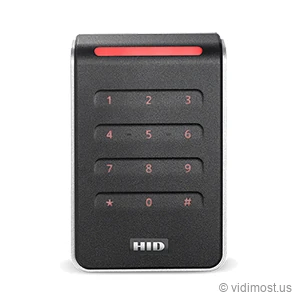
The HID Signo 40K is a wall-switch-sized keypad reader in HID's Signo line. It reads 125 kHz prox, 13.56 MHz smart cards, and phone credentials over Bluetooth and NFC, and its built-in PIN pad lets you require a card or phone plus a code at the door.
We install and repair access control systems across Chicago, the North Shore and the northwest suburbs — ask about the Signo 40K for your
building or business.
Form factorSingle-gang / wall-switch size with 3x4 keypad
Security projects in Chicago North Shore – homes, small business and
multifamily buildings, depending on how the system is designed.
How we use it
As part of complete systems (cameras, access control, intercoms, networking)
rather than standalone online sales.
Product overview and installer notes
The Signo 40K is the full-size, single-gang member of HID's Signo family, and the one with a keypad built in. That keypad is what earns its place on the wall: on this reader you can require two factors at a single door, a card or phone tap and a PIN, so a lost badge or a borrowed phone alone won't open it. It reads across three frequency bands on one device, from legacy 125 kHz prox badges through 13.56 MHz smart cards (Seos, iCLASS, MIFARE DESFire) up to mobile credentials over Bluetooth and NFC, including an Apple Wallet employee badge. That range makes it a good fit where you want the strictest rule on your most sensitive door, a server room, a pharmacy, a cash room, while the rest of the building runs on plain tap-to-enter. It wires to your access panel over Wiegand or OSDP, carries an IP65 rating for outdoor doors, and can be reconfigured after install through HID's Reader Manager app without pulling it off the wall. If you don't need the PIN pad, the keypad-free Signo 40 is the same reader minus the buttons.
Specs, firmware notes and availability change over time — confirm against the
manufacturer’s current documentation before ordering.
Two factors at the door: card or phone, plus a PIN
The keypad on the front of the 40K is what sets it apart from the rest of the Signo line. With it, you can set a door to demand two things before it opens: a credential the person has (a card or a phone tap) and a code the person knows (a PIN they type in). A dropped badge in a parking lot doesn't open that door. Neither does a phone someone left on a desk. Both pieces have to show up together.
That's the rule you want on the doors where a single lost credential is a real problem. Server rooms and IDF closets. Pharmacy and controlled-substance storage. Cash rooms, teller areas, and safe-deposit vaults. Records rooms with tenant or medical files. On those doors, the extra second it takes to punch a code is worth it; on the front lobby, it usually isn't.
The practical way to deploy this is a split policy. You run plain tap-to-enter on the everyday doors, keypad-free readers doing a single factor, and you reserve the 40K for the short list of doors that need the strict rule. Your access software decides which doors are card-only and which are card-plus-PIN, and it can enforce card-plus-PIN only during off-hours if you want the door easier to use during the workday. The reader hardware is the same either way; the policy lives in the controller.
PINs come with one caveat: a keypad code is only as good as how it's managed. Each person should have their own PIN tied to their credential, not a shared building code taped inside a cabinet. Handled that way, the 40K gives you the tightest door policy HID's wall readers offer, and a clean audit trail of who used both factors and when.
Credentials the 40K accepts
The 40K is a multi-technology reader, which means it listens on three different radio bands at once and doesn't care which kind of credential you present. On the oldest band, 125 kHz, it reads legacy proximity badges: HID Prox, Indala, AWID, and EM. These are the thick white or gray cards a lot of Chicago buildings have carried for years. On the middle band, 13.56 MHz, it reads modern encrypted smart cards, HID Seos, the iCLASS family, and MIFARE DESFire, which are much harder to clone than old prox.
On the top band, 2.4 GHz Bluetooth plus NFC, it reads phones. A resident or employee can carry an HID Mobile Access credential in the app, or an employee badge in Apple Wallet, and tap the phone the same way they'd tap a card. That works out of the box, with no add-on module bolted onto the reader.
Reading all three at once is what makes this reader useful during a migration. A common approach: turn on the new smart-card and mobile credentials for one floor or one tenant at a time, leave 125 kHz active so the old prox badges keep working, and switch off the legacy band in software once that group is fully moved over. Hang the 40K, no cutover weekend, no reader swap. If you only ever needed old prox, a simpler reader like the ThinLine II would do it; the 40K earns its place when you want to move a building forward at your own pace, and add a PIN on top.
Power and wiring: how it talks to your panel
The 40K wires to an access control panel two ways. The older way is Wiegand, the standard almost every controller has understood for decades. The newer way is OSDP over an RS-485 pair, which HID builds in natively here, including OSDP Secure Channel, meaning the run between the reader and the panel is encrypted in both directions. On a door where you're already going two-factor, running OSDP so the wire itself is protected is the sensible pairing.
It runs on 12V DC and draws a modest amount of current, about 70-80 mA in normal use with a 250 mA peak, so it's easy on a panel's power budget. There's no PoE on this reader; power and data come up the cable from the controller, either through the short factory pigtail or a terminal strip. It lands on the same panels the rest of these readers do, a Paxton Net2 controller over Wiegand, or a cloud platform like Brivo, so it fits into a system you may already have.
One field advantage worth calling out: OSDP lets us configure and update the reader after it's mounted, through HID's Reader Manager app, without taking it off the wall. If a credential type needs to be turned on later, or firmware needs a bump, that's a phone-and-app job, not a screwdriver job. The secure element inside is EAL5+-grade hardware, which is the security-lab tier that matters most on a two-factor door.
Mounting and the real install
The 40K is the wide, full-size Signo, sized to sit over a US single-gang (wall switch) box and cover it. That's the standard box next to most interior and exterior doors, so on a lot of retrofits it drops onto wiring that's already there. It ships with a slotted mounting plate for back boxes that don't line up on standard spacing.
It's built for outdoor Chicago doors. The housing is rated IP65 against rain and dust and UL294 for indoor and outdoor use, and it's specified from -31°F to +150°F, which covers a Chicago January and a rooftop-door August. When the reader goes on metal, an aluminum door frame or a metal single-gang box, a surface-detection feature auto-tunes the read range so it holds a normal tap distance instead of falling off the way an untuned reader would in that spot.
If you want the same technology and PIN capability on a narrow aluminum door frame where a wall-size reader won't fit, the mullion-width version with a keypad is the Signo 20K. The 40K is the one to reach for when there's a single-gang box to cover and you want the full-size keypad.
Where the 40K fits against its siblings
Inside the HID Signo line, the choice comes down to size and whether you need buttons. The 20-series is the slim mullion width for door frames; the 40-series is the full wall-switch width. Within each size, the plain model is tap-only and the K model adds the keypad. So the keypad-free wall version is the Signo 40, the mullion tap-only is the Signo 20, and the mullion-with-keypad is the Signo 20K. The 40K is the full-size keypad reader, the one built for a strict two-factor door.
Compared to older HID lines, the 40K is the current-generation answer to the dual-tech single-gang readers many buildings already run, like the multiCLASS SE RP40. If mobile access and the newest credential support matter, the Signo is the forward choice; the multiCLASS is the like-for-like swap when you're matching existing hardware. And if you want the strict rule but don't need to read legacy prox at all, note that the smart-card-only iCLASS SE R40 is a narrower fit; the 40K's advantage is reading everything at once.
We install and program these on access control jobs across Chicago and the North Shore. Tell us which doors need the strict two-factor rule and which just need a tap, and we'll spec the reader mix, wire it to your panel, and set the policy so the right doors ask for a PIN and the rest stay quick.
Common questions about the Signo 40K
Do I have to use the keypad on every door?
No. The keypad is there when you want it, but whether a door requires a PIN is set in your access software, not baked into the reader. You can run the 40K as a plain tap-to-enter reader on most doors and turn on card-plus-PIN only on the sensitive ones. Many buildings even set it to require the PIN only during off-hours and let a single tap through during the workday.
Will it read the prox badges we already hand out?
Yes. The 40K reads legacy 125 kHz prox, HID Prox, Indala, AWID, and EM, alongside modern 13.56 MHz smart cards and phones, all at the same time. That's the point of a multi-technology reader: you can hang it now, keep your existing badges working, and move people to Seos cards or mobile credentials on your own schedule instead of swapping everyone at once.
Can people use their phones, and does it need an extra module?
Phones work out of the box, no add-on hardware. The reader supports HID Mobile Access over Bluetooth and NFC, so a credential lives in the HID app and taps like a card, and it also supports an employee badge in Apple Wallet using Apple's ECP. Google Wallet support wasn't something we could confirm from HID's published material, so ask us if that's a requirement and we'll verify it for your platform.
How does it wire to our controller, and does it need PoE?
It connects over Wiegand or over OSDP on an RS-485 pair, whichever your panel uses. There's no PoE; it runs on 12V DC and draws about 70-80 mA (250 mA peak), powered up the cable from the controller. On a two-factor door we'd usually recommend OSDP so the reader-to-panel link is encrypted with OSDP Secure Channel.
Signo 40K or Signo 20K, which do I need?
They're the same technology and the same keypad; the only difference is size. The 40K is the full wall-switch width, meant to cover a single-gang box next to the door. The 20K is the slim mullion width, meant for a narrow aluminum door frame where a full-size reader won't fit. Pick by the door: single-gang box, get the 40K; skinny metal frame, get the 20K.
Can it go on an outdoor door in Chicago winter?
Yes. It's rated IP65 for rain and dust, UL294 for outdoor use, and specified from -31°F up to +150°F, so it holds up through a Chicago winter and a hot rooftop door in summer. It also auto-tunes its read range when mounted on a metal box or aluminum frame, so it keeps a normal tap distance in the spots where readers often struggle.
Service, upgrade and maintenance
If you already have HID hardware on site and the system is unstable,
we can audit it, fix urgent issues and plan upgrades step by step instead of
forcing a complete replacement. This includes systems originally installed by
other vendors.
We offer free estimates for projects in our service area. New
service clients also receive a 50% discount on the first service visit
for troubleshooting and diagnostics, including systems we did not install.
To move forward, go to the Contact page and mention model Signo 40K in your message. You can also attach photos of
your existing equipment, panels or racks to speed up the design and service
process.