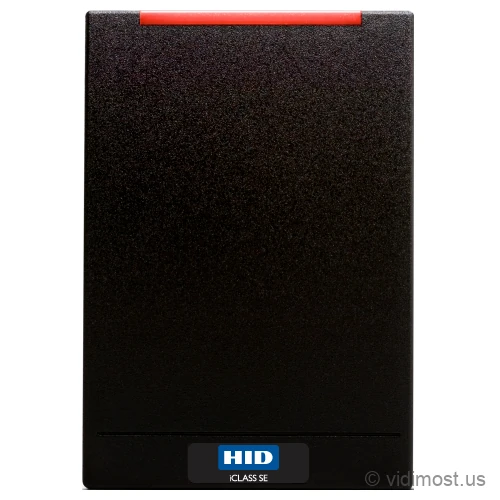
The HID iCLASS SE R40 is a 13.56 MHz smart-card door reader in HID's iCLASS SE line, built in the wall-switch size that covers a standard single-gang box. It reads iCLASS Seos, iCLASS SE, standard iCLASS, MIFARE Classic and DESFire EV1, plus phones over NFC (and over Bluetooth on the Bluetooth-equipped mobile-ready model). It ships with Wiegand and Clock-and-Data output and can run OSDP over RS-485 with Secure Channel as an optional mode.
We install and repair access control systems across Chicago, the North Shore and the northwest suburbs — ask about the R40 for your
building or business.
Reader familyHID iCLASS SE, wall-switch (single-gang) size
Frequency13.56 MHz only (does not read 125 kHz prox)
Credentials readiCLASS Seos, iCLASS SE, standard iCLASS, MIFARE Classic, MIFARE DESFire EV1
MobileHID Mobile Access over NFC on the base model; Bluetooth requires the Bluetooth-equipped mobile-ready SKU
Wiegand and Clock-and-Data by default; OSDP over RS-485 with Secure Channel as an optional mode
Power
5-16 VDC, linear supply recommended; about 40 mA in Intelligent Power Management mode
Mounting
Covers a US single-gang switch box; slotted plate for EU/Asia back boxes; any flat surface
Environment
IP55 ingress rating; rated -31 to 150 F operating
Data security
Secure Identity Object (SIO) with keys held in EAL5+ secure-element hardware; field-upgradable firmware
Typical use
Security projects in Chicago North Shore – homes, small business and
multifamily buildings, depending on how the system is designed.
How we use it
As part of complete systems (cameras, access control, intercoms, networking)
rather than standalone online sales.
Product overview and installer notes
Sized to sit over a single-gang wall-switch box, the R40 is the widest reader in HID's standard iCLASS SE family and covers the opening cleanly on an interior door. Out of the box it sends card data to the controller over Wiegand or Clock-and-Data, the same one-way output older panels expect. Where it earns its place on higher-security doors is the optional mode: it can run OSDP over RS-485 with Secure Channel as an alternative to that default output, so the link between reader and controller becomes encrypted, supervised, and two-way instead of plaintext. In OSDP mode the panel knows if the reader is cut or removed, and no one can splice the wire and replay card data. On the credential side it reads iCLASS Seos, iCLASS SE, standard iCLASS, MIFARE Classic and MIFARE DESFire EV1, and accepts phone credentials over NFC, with Bluetooth available on the Bluetooth-equipped mobile-ready model, which lets one reader carry a mixed badge population through a migration. Firmware is field-programmable, so the reader can be re-keyed or updated in place instead of swapped. It is the SE reader we put on higher-security interior doors in Chicago buildings.
Specs, firmware notes and availability change over time — confirm against the
manufacturer’s current documentation before ordering.
OSDP and Secure Channel: why the R40 goes on higher-security doors
Most old card readers talk to the door controller over Wiegand. Wiegand works, but it is one-way and unencrypted. The reader sends card numbers down the wire in the clear, and the controller has no idea if the reader is still there or if someone has cut it off the wall. An attacker who reaches the wires behind the reader can read badge numbers or replay them. For a mullion reader on a low-risk perimeter door that is usually fine, but for an interior door protecting a server closet, a pharmacy, a records room, or a management office, we want more.
The R40 ships speaking Wiegand and Clock-and-Data, and you can switch it into an optional mode: OSDP over RS-485 with Secure Channel. Turn that on and the connection between the reader and the controller becomes encrypted, two-way, and supervised. Encrypted means the card data on the wire is scrambled, so tapping the cable gets you nothing useful. Two-way means the controller and reader actually talk back and forth instead of the reader just shouting numbers. Supervised means the controller notices immediately if the reader is disconnected or tampered with, and can alarm on it. That combination is why we run the R40 in OSDP mode on the doors that matter most inside a building.
Two more practical wins come with OSDP. First, one pair of RS-485 wires can carry multiple readers, which simplifies the cable runs on a multi-door job. Second, the R40's firmware is field-programmable, so it can be re-keyed or updated in place over that same secure link instead of being pulled off the wall and swapped. A reader you can update is a reader that lasts. If you want us to design and manage the whole system around this, that is our access control service.
Credentials the R40 accepts
The R40 is a 13.56 MHz smart-card reader. That is the modern, encrypted card frequency. It reads HID's own iCLASS Seos, iCLASS SE, and standard iCLASS cards, and it also reads MIFARE Classic and MIFARE DESFire EV1, which are common on cards issued by other systems. In practice that means if your building already handed out a pile of badges, this one reader can usually keep reading them. A common way to run the changeover: leave the existing 13.56 MHz cards working, hand new hires the newer credential from day one, and re-badge each department as its cards wear out. Nobody has to line up for a reissue.
It also accepts phone credentials through HID Mobile Access. The base model reads phones over NFC, a tap of the phone like a card; Bluetooth, which lets a phone be presented from a short distance, comes on the Bluetooth-equipped mobile-ready SKU, so pick that version if you want it. Phones also need a mobile-ready keyset configuration, which we handle during setup. The R40 is 13.56 MHz only. It does not read old 125 kHz HID Prox cards. If your building still runs on Prox and you need to read both old and new during a changeover, use the dual-technology multiCLASS SE RP40 instead, which is the same wall-switch size but adds a 125 kHz antenna.
Under the hood, identity data on the card and the reader is protected by HID's Secure Identity Object (SIO), with the keys held in EAL5+ certified secure-element hardware. That is the same data-protection model across the SE line; you can read more on the HID brand page.
Power and wiring to a controller
The R40 runs on 5 to 16 VDC, and HID recommends a linear power supply rather than a switching one to keep read range steady. Draw is low: about 40 mA in Intelligent Power Management mode and 80 mA in standard mode, with a brief 240 mA peak. Those are small numbers, which matters when you are powering several readers off one access panel.
Wiring is where you make the OSDP-versus-Wiegand call. Straight out of the box the R40 speaks Wiegand and Clock-and-Data, so it drops onto old cabling with no reconfiguration. If your panel supports OSDP over RS-485, we prefer to enable that optional mode for the encryption and supervision described above. Either way, the reader lands on a door controller such as the Paxton Net2 Plus one-door controller, or on a cloud platform like Brivo if you want browser-based management across multiple sites. We confirm the panel's OSDP support before we commit the design so there are no surprises at commissioning.
Mounting and the real install situation
This is the wall-switch size reader, the widest in the standard SE line. It is built to mount over a US single-gang switch box and fully cover the opening. That coverage is the reason we specify an R40 over a slim mullion reader on an interior door: when there is an existing single-gang cutout in the wall, or a light-switch-style plate, the R40 hides it cleanly, where a narrow mullion reader would leave a bare hole beside it. It also ships with a slotted plate for European and Asian back-box spacing and mounts to any flat surface.
One field note on read range. The R40 reads through drywall, wood, and plastic without trouble, but set it straight onto metal and the antenna loses range, on the order of a fifth. On a metal door frame or mullion we shim it off the metal with a spacer to bring the range back. That metal-frame case is also where a purpose-built mullion reader like the iCLASS SE R10 makes more sense. Its ingress rating is IP55 and it is rated from -31 to 150 F, so a well-sited exterior door in a Chicago winter is within spec, though the R40's real home is interior doors.
Where the R40 fits against its siblings
Inside the SE family, the choice comes down to size and features. The R10 is the compact mullion reader for narrow door frames. The R15 is a mobile-ready mullion. The R40 is the single-gang, wall-switch member you pick when you need to cover a box or want the larger read target on a higher-security interior door.
Step outside the SE family when your credentials change. If you still have 125 kHz prox cards in circulation, the dual-technology multiCLASS SE RP40 is the same size but reads both frequencies during a migration, and for prox-only jobs the classic ThinLine II is the thin 125 kHz wall reader. If you are specifying a brand-new building with no legacy badges, look at HID's newer line: the Signo 40 is the current-generation single-gang reader, and the Signo 40K adds a keypad for PIN-plus-card on your most sensitive doors. We help pick the right one for your building and door mix in Chicago and the North Shore.
Common questions about the R40
Will the R40 read the access cards my building already uses?
If your cards are 13.56 MHz, very likely yes. The R40 reads iCLASS Seos, iCLASS SE, standard iCLASS, MIFARE Classic and MIFARE DESFire EV1. It does not read 125 kHz HID Prox cards, so if your building is still on old Prox badges, you would need the dual-technology multiCLASS SE RP40 instead. Send us a sample card or the part number printed on it and we will confirm before you buy.
What is the advantage of OSDP over the usual Wiegand wiring?
The R40 uses Wiegand or Clock-and-Data by default, and OSDP over RS-485 with Secure Channel is an optional mode you can switch it into. In OSDP mode the reader-to-controller link is encrypted, two-way, and supervised, where Wiegand is one-way and sent in the clear. That means card data on the wire is scrambled and the controller can tell if the reader is cut or removed and alarm on it. It is the reason we run the R40 in OSDP mode on higher-security interior doors. Your access controller has to support OSDP to use it, which we verify up front; otherwise the R40 keeps running on standard Wiegand.
Can staff use their phones instead of a card?
Yes. The R40 supports HID Mobile Access, so people can present their phone in place of a badge. The base model reads phones over NFC; if you want Bluetooth, where the phone reads from a short distance, order the Bluetooth-equipped mobile-ready version. Either way it needs a mobile-ready keyset configuration and a Mobile Access subscription, which we set up during commissioning. One reader can accept both physical cards and phones at the same time, which is useful when only some of your tenants want to go mobile.
Should I choose the R40 or the smaller R10 mullion reader?
Pick the R40 when the door has a single-gang box or existing cutout to cover, or when you want the larger read target on a high-value interior door. Pick the R10 when the reader has to fit on a narrow metal door frame or mullion where the wide R40 will not sit flat. They read the same credentials and support the same optional OSDP wiring; the difference is size and mounting surface.
Can the R40 go on an exterior door in Chicago weather?
It carries an IP55 ingress rating and is rated from -31 to 150 F, so a covered exterior door is within spec. That said, the R40's real strength is interior high-security doors, and mounting it on a metal exterior frame cuts read range unless you shim it off the metal with a spacer. For exposed exterior entries we usually spec a reader built for that placement, and we will advise based on the actual door during the site walk.
Does the R40 need to be replaced when we upgrade security keys later?
No, that is a point in its favor. The firmware is field-programmable, so the reader can be re-keyed or updated in place rather than pulled off the wall and swapped, and over an OSDP link that update happens over the secure connection. That extends the reader's useful life through a credential change instead of forcing a hardware replacement.
Service, upgrade and maintenance
If you already have HID hardware on site and the system is unstable,
we can audit it, fix urgent issues and plan upgrades step by step instead of
forcing a complete replacement. This includes systems originally installed by
other vendors.
We offer free estimates for projects in our service area. New
service clients also receive a 50% discount on the first service visit
for troubleshooting and diagnostics, including systems we did not install.
To move forward, go to the Contact page and mention model R40 in your message. You can also attach photos of
your existing equipment, panels or racks to speed up the design and service
process.