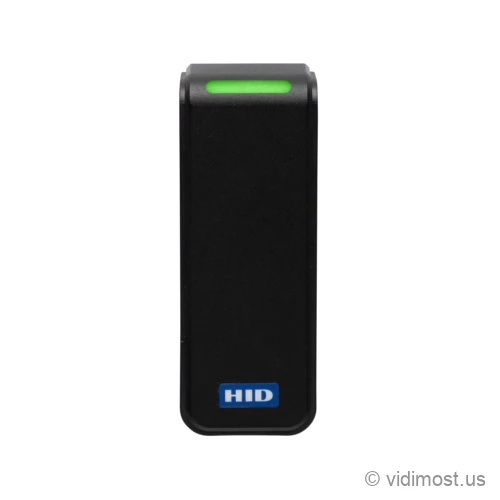
The HID Signo Express is a mobile-first mullion door reader from HID's Signo line. It reads Seos smart cards and phone credentials over both Bluetooth and NFC, and also picks up MIFARE and DESFire cards by serial number for migration. It ships in a fixed configuration and connects over Wiegand, so you mount it and wire it. Narrow black housing sized for a door frame or any flat surface.
We install and repair access control systems across Chicago, the North Shore and the northwest suburbs — ask about the Signo Express for your
building or business.
Reader familyHID Signo (Express, mullion form factor)
Physical cardsHID Seos smart cards; MIFARE Classic and DESFire EV1/EV2/EV3 and ISO14443 by CSN/UID
Mobile credentialsHID Mobile Access over Bluetooth LE and NFC
Mullion / door frame or flat surface, fixed default config
Environment
IP65, UL294 indoor/outdoor, -35 C to +66 C
Remote management
HID Reader Manager app over Bluetooth
Typical use
Security projects in Chicago North Shore – homes, small business and
multifamily buildings, depending on how the system is designed.
How we use it
As part of complete systems (cameras, access control, intercoms, networking)
rather than standalone online sales.
Product overview and installer notes
Most Signo readers are built to handle every card format an old building might throw at them. The Signo Express goes the other direction: it strips the Signo down to the parts that matter for a card-and-phone building and skips the rest. It reads HID Seos smart cards and HID Mobile Access credentials on phones, over both Bluetooth Low Energy and NFC, out of one narrow mullion housing. It will also read MIFARE Classic and DESFire cards by their serial number, which helps when you're migrating a building off older 13.56 MHz badges. Because it ships in a set fixed configuration instead of a build-to-order spec, there's no configurator to work through and no legacy multi-tech options to pay for — it arrives ready to wire. It connects to your panel over Wiegand at the terminal, which nearly every access controller accepts. That makes it the shortest path to a mobile access deployment for a smaller building or a single entrance. One note before you plan around it: HID sells the Signo Express outside North America, so for a Chicago job we'd usually spec a standard Signo 20 and treat this page as the reference for how the Express fits.
Specs, firmware notes and availability change over time — confirm against the
manufacturer’s current documentation before ordering.
The shortest path to phone-based access
The Signo Express exists for one situation: you want people to badge in with their phones, and you don't want to stand up a big credential system to do it. It reads HID Mobile Access credentials — the ID lives in an app on the phone — over both Bluetooth and NFC. A resident holds up their phone, the door opens. The same reader also takes HID Seos smart cards, so the people who don't want the app can still carry a plastic credential. Card and phone, one reader, no separate hardware for each.
The fixed configuration is what makes it the easy path. A standard Signo is built to order — you choose from a long list of card technologies and options. The Express skips that. It comes set up for Seos and mobile, so there's no configurator to navigate and no legacy formats padding the spec. For a small building or a single main door, that's less to decide and less to pay for. If your building instead needs to read a mix of old and new cards, the full-featured Signo 20 is the one that covers everything.
Firmware and the reader's beep-and-light behavior update over Bluetooth through the HID Reader Manager app on a phone — the same remote-management model as the rest of the Signo line. Once it's on the wall you don't have to take it down to change settings.
Cards and phones the Express reads
Start with the two credentials it's built around. Seos is HID's current encrypted smart card — a modern, hard-to-clone 13.56 MHz card that replaces the old 125 kHz proximity fobs a lot of buildings still run. HID Mobile Access is the phone version of that same secure credential, delivered to a resident's phone and read over Bluetooth or tap-to-read NFC. Both are built on the same Seos security, so a building can hand out cards, phones, or a mix, and manage them the same way. Beyond those, the Express also reads MIFARE Classic and DESFire EV1/EV2/EV3 and other ISO14443 cards — but by their serial number (CSN/UID) only, not the secure data on them. That's an identifier read, useful when you're moving a building off existing 13.56 MHz badges and want the current cards to keep opening doors during the changeover.
Here's the boundary: the Express does not read 125 kHz proximity cards at all. If your property still runs 125 kHz prox or a grab-bag of legacy formats, this reader is the wrong tool. The multiCLASS SE RP15 reads old 125 kHz prox and new 13.56 MHz smart cards in one unit and adds mobile, so you can retire prox floor by floor and turn off 125 kHz in software once the last card is out. Pick the Express when you're starting clean on smart cards and phones; pick a dual-tech reader when 125 kHz prox has to keep working.
Power and wiring to your controller
Wiring is standard door-reader wiring. The Express runs on 12 V DC and pulls very little current — on the order of tens of milliamps in normal use — so it lives comfortably on the same power a typical access panel already provides. It connects to your controller one way: Wiegand, wired at the terminal. Wiegand is the older one-directional signaling that nearly every access panel understands, so the Express drops into an existing system next to whatever readers are already there.
The catch to plan for: the Express does not do OSDP. There's no RS-485 output and no encrypted, two-way link back to the panel. If you want OSDP — for the encrypted supervised wire and for pushing configuration from the panel — that's a reason to step up to a standard Signo 20 or Signo 40, which support it. On the panel side, controllers like the Paxton Net2 Plus door controller take the Express over Wiegand without any trouble. If you're not sure how your building is wired, that's exactly the kind of thing we sort out during a site walk for access control.
Mounting and the real install
The Express is a mullion reader — the tall, narrow shape that fits on the metal or aluminum frame beside a glass entrance door, where a wider reader wouldn't. That covers a lot of Chicago apartment and condo lobbies, where the main door is glass in a slim frame. It also screws flat to a wall or column when there's more room. The housing is IP65 rated and UL294 listed for indoor and outdoor use, and it's rated from -35 C well past anything a Chicago winter produces, so it holds up on an exterior gate or entrance without a special enclosure.
It ships ready to mount in its default configuration — out of the box and onto the frame — with optional spacers on the Signo platform if you need to stand it off a metal surface a little, which keeps a steel frame from pulling down the read range. If you want the same footprint and weatherproofing but with a keypad for a PIN-plus-credential door, the Signo 20K is the mullion Signo that adds keys. For a wider single-gang reader where the frame allows it, the Signo 40 is the same technology in a larger body.
Where it fits against its siblings
Think of the Express as the entry point to the HID Signo line for a card-and-phone building. It gives you Seos and mobile in a mullion reader without the cost and complexity of a fully-configurable multi-tech unit. Step up to the Signo 20 when you need to read older or mixed card formats alongside the new ones, when you want OSDP wiring, or to the Signo 20K when a door needs a keypad. Coming from an older smart-card reader like the iCLASS SE R15, the Express is the natural mobile-forward replacement in the same slim shape.
One practical caveat that drives the decision: HID markets the Signo Express outside North America, so it isn't a standard U.S. catalog part. For a job in Chicago or the North Shore, we'll usually spec the standard Signo 20 to get the same mobile and Seos support with local availability, OSDP wiring, and support. Use this page to understand the Express's role; when you're ready to plan a door, we'll match the exact reader to what's stocked and supported here.
Common questions about the Signo Express
Does the Signo Express work with phones, and how?
Yes — that's its main job. It reads HID Mobile Access credentials, which live in an app on the resident's phone, over both Bluetooth Low Energy and tap-to-read NFC. The phone credential uses the same Seos security as the physical cards, so you can hand out cards, phones, or both and manage them the same way.
Can it read our existing key cards?
It depends on the card. HID Seos 13.56 MHz smart cards read as secure credentials. It also reads MIFARE Classic and DESFire EV1/EV2/EV3 and other ISO14443 cards, but only by their serial number (CSN/UID), not the secure data — which is enough to keep existing 13.56 MHz badges working while you migrate people to Seos or mobile. What it will not read is 125 kHz proximity cards. If your building still runs prox, you'd want a dual-technology reader like the multiCLASS SE RP15 or a full Signo 20, which read both old prox and new smart cards so you can upgrade over time instead of all at once.
How does it connect to our access control panel?
Over Wiegand, wired at the terminal — the older one-directional signaling that almost every access panel accepts, so it drops into an existing system. The Express does not do OSDP or RS-485; if you need the encrypted, two-way OSDP wiring, that's a reason to move up to a standard Signo 20 or Signo 40. It runs on 12 V DC and draws very little current, so it sits on standard reader power.
Should I choose the Signo Express or the standard Signo 20?
Choose the Express if you're starting clean on Seos cards and phone credentials and want the simplest, lowest-cost path — it ships in a fixed configuration with no options to work through. Choose the Signo 20 if you need to read a mix of old and new card formats, if you want OSDP wiring instead of Wiegand, or if you're doing a job in the U.S., since the Express is sold mainly outside North America and the Signo 20 is the locally-supported equivalent.
Is it okay to mount outside on a gate or exterior door?
Yes. It's IP65 rated against dust and water and UL294 listed for outdoor use, and its operating range runs from -35 C, colder than any Chicago winter. It mounts on a narrow door frame in mullion shape or flat on a wall or column, and ships ready to install without a separate weather enclosure.
Can we manage it after it's installed without pulling it off the wall?
Yes. Firmware and the reader's light and sound settings update over Bluetooth through the HID Reader Manager app on a phone, the same as the rest of the Signo line. Because the Express wires over Wiegand, all of that management happens through the app rather than back through the panel — you make the changes from your phone standing at the door.
Service, upgrade and maintenance
If you already have HID hardware on site and the system is unstable,
we can audit it, fix urgent issues and plan upgrades step by step instead of
forcing a complete replacement. This includes systems originally installed by
other vendors.
We offer free estimates for projects in our service area. New
service clients also receive a 50% discount on the first service visit
for troubleshooting and diagnostics, including systems we did not install.
To move forward, go to the Contact page and mention model Signo Express in your message. You can also attach photos of
your existing equipment, panels or racks to speed up the design and service
process.