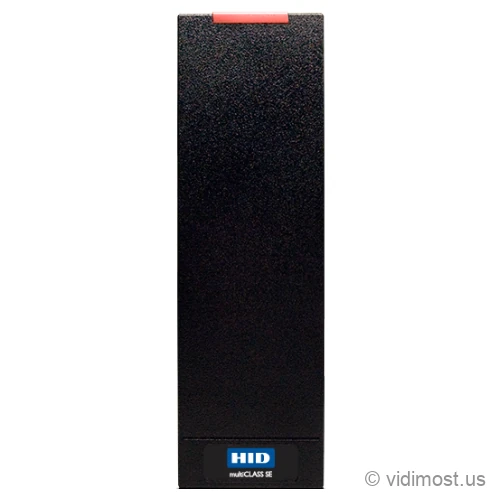
The HID multiCLASS SE RP15 is a slim mullion door reader from HID's multiCLASS SE family that reads both 125 kHz prox cards and 13.56 MHz smart cards at the same time. One reader on the door frame handles HID Prox, Indala, AWID, EM4102, iCLASS, iCLASS SE, Seos, and SIO-enabled MIFARE. Every RP15 also reads NFC phones over Seos out of the box, and a field kit adds Bluetooth phone unlock plus OSDP.
We install and repair access control systems across Chicago, the North Shore and the northwest suburbs — ask about the RP15 for your
building or business.
13.56 MHz credentialsiCLASS Seos, iCLASS SE, standard iCLASS, SIO-enabled MIFARE Classic and DESFire EV1
MobileNFC phones via Seos over 13.56 MHz built in; Bluetooth (HID Mobile Access, tap or Twist and Go) added by factory BLE part or field kit BLEOSDP-UPG-A-910
Wiegand or Clock-and-Data out of the box; field kit BLEOSDP-UPG-A-910 adds OSDP with Secure Channel over RS-485
Power
5-16 VDC from the access panel, linear supply recommended; no PoE
Mounting
Mullion / door frame, U.S. single-gang J-box, or flat surface; black or gray; no keypad
Environment
IP55; rated -31 to 150 F (-35 to 65 C); UL294 (Wiegand output), FCC, CE, RoHS certified
Security
HID SIO data model on 13.56 MHz credentials; EAL5+ secure element
Typical use
Security projects in Chicago North Shore – homes, small business and
multifamily buildings, depending on how the system is designed.
How we use it
As part of complete systems (cameras, access control, intercoms, networking)
rather than standalone online sales.
Product overview and installer notes
The multiCLASS SE RP15 is HID's slim mullion reader that covers two card frequencies in a single body, which is exactly what a mixed-credential building needs at the door. It reads legacy 125 kHz credentials — HID Prox, Indala, AWID, EM4102 — and modern 13.56 MHz smart cards — iCLASS Seos, iCLASS SE, standard iCLASS, and SIO-enabled MIFARE Classic and MIFARE DESFire EV1 — with no hardware swap. That dual read is what lets a building change credentials on its own schedule: keep issuing old fobs while you hand new residents encrypted Seos cards, and the same reader takes both. Every RP15 also reads NFC phones through Seos over 13.56 MHz straight out of the box, with no add-on. Bluetooth phone unlock over HID Mobile Access is a separate step: it comes from a factory Bluetooth part or from HID's field kit BLEOSDP-UPG-A-910, which snaps in to add Bluetooth and OSDP to a reader you already installed. The base RP15 wires to your access panel over Wiegand, and that same kit is how you move the reader-to-panel line to encrypted OSDP over RS-485. Below we lay out exactly which cards it reads and how to tell what your Chicago building already uses.
Specs, firmware notes and availability change over time — confirm against the
manufacturer’s current documentation before ordering.
Every card, fob and phone the RP15 accepts
Access credentials split across two radio bands, and the RP15 covers both. On the older 125 kHz band it reads HID Prox, Indala (Indala Prox), AWID, and EM4102 — the thick white or clamshell cards and fobs that most Chicago buildings have been handing out for fifteen-plus years. On the modern 13.56 MHz band it reads iCLASS Seos, iCLASS SE, standard iCLASS, and SIO-enabled MIFARE Classic and MIFARE DESFire EV1. That second group is the encrypted, harder-to-clone family that new systems ship with. There is one more credential the RP15 reads on that same 13.56 MHz band and it is easy to miss: an NFC phone carrying an HID Mobile ID in Seos. That works on every RP15, including the plain card SKU, with no add-on module.
In practice the reader listens on both bands continuously, so a credential that only lives at one frequency still works. There is no mode to pick and no switch to flip. Tap a 2005-era Prox fob and it reads; tap a brand-new Seos card and it reads that too. That two-band coverage is the reason to pay for a dual-technology reader instead of a single-frequency one like the HID MiniProx (125 kHz only) or the iCLASS SE R15 (13.56 MHz only).
To tell what your building already runs, look at a working card. HID Prox cards usually say Prox or ProxCard and are often thicker clamshells. iCLASS and Seos cards are thin and printed with iCLASS, iCLASS SE, or Seos. MIFARE cards say MIFARE Classic or DESFire. If the printing has worn off, the card's part number or the make of your current reader tells the story — send us a photo and we'll identify it. The RP15 covers all of the above, so you rarely have to reissue credentials on day one.
Changing credentials without touching the reader
Reissuing every fob in a single weekend is exactly what most buildings want to avoid, and the RP15 lets you skip it. Because the reader accepts old 125 kHz Prox and new 13.56 MHz Seos or MIFARE at the same door, a mixed card population can run for as long as you like: existing residents keep the fob in their pocket, new move-ins get an encrypted card, and both open the same door.
A common approach in a mid-rise is to go floor by floor. Install RP15 readers everywhere, then reissue encrypted Seos or DESFire cards one floor at a time as leases turn over, while the rest of the building keeps tapping the Prox fobs it already has. Nothing at the door changes during any of it. When the last Prox card is out of circulation, you switch that format off inside the access software — you never revisit a reader to do it. If you're standardizing on iCLASS SE smart cards but a handful of legacy doors still run Prox, one RP15 model covers the whole property.
This is also the clean answer when two systems merged — say a condo association that absorbed an adjacent building on a different card format. One dual-frequency reader at each door reads both card stocks while you consolidate. We plan these migrations as part of our access control work in Chicago and the North Shore.
Phone unlock: NFC today, Bluetooth when you add the kit
Phone credentials on the RP15 come in two layers, and it helps to keep them straight. The first is built into every reader: an NFC phone holding an HID Mobile ID in Seos taps the reader at close range over 13.56 MHz, the same way a Seos card does. No extra part, no factory option — the card-only RP15 already does this.
The second layer is Bluetooth, and it is a deliberate add. Bluetooth is what gives you HID's Twist and Go gesture — turn the phone as you walk up and the door releases from a few feet away — plus longer-range presentation than a close NFC tap. It works on iOS and Android. You get Bluetooth one of two ways: order a factory BLE part number, or snap HID's field kit BLEOSDP-UPG-A-910 (the R15/RP15 version) into a reader you already mounted. The kit is a plug-in module and a metallic backplate sticker, one kit per reader. Worth flagging: that kit adds Bluetooth and OSDP, not NFC — NFC was already there from the start. So you can wire card readers now and turn on Bluetooth phone unlock later without pulling anything off the wall. If phone credentials are a firm requirement up front, tell us and we'll spec the factory BLE part. For a mobile-first door on a tighter budget, the newer Signo Express is worth comparing.
Power, wiring, and how it connects to your panel
The RP15 is a reader, not a controller — it reports a credential to the access panel, and the panel decides whether to release the door. Out of the box it talks to the panel over Wiegand (or Clock-and-Data), the two-data-wire scheme readers have used for decades, over cable runs up to about 500 ft on 22 AWG shielded wire. That drops onto almost any existing access system, including a Paxton Net2 controller or a cloud platform like Brivo.
It draws 5-16 VDC from the panel, with a linear supply recommended — there is no PoE on this reader, so it does not run over a network cable to a switch. When you want the reader-to-panel line encrypted and supervised, the same BLEOSDP-UPG-A-910 kit that adds Bluetooth also moves the reader to OSDP over RS-485 with Secure Channel, so the panel can watch the line and manage the reader centrally. One certification note: the RP15's UL294 listing covers Wiegand output, so confirm your requirements if a UL294 OSDP run is mandated. If you want the deeper Wiegand-versus-OSDP discussion, the RP10 and Signo 20 pages cover it as well.
Mounting, and where the RP15 fits against its siblings
The RP15 is a slim mullion-size reader — about 1.9 inches wide, narrow enough to sit on the metal frame beside a glass door, which is the tight spot most single-gang readers won't fit. It also mounts on a U.S. single-gang J-box with a mud ring or on any flat surface, and comes in black or gray. It carries an IP55 rating and holds up on exterior doors, rated from 150 F down to -31 F, so Chicago winters are inside its range. Keep one thing in mind on a steel frame: bolting the reader flat against metal detunes it and can shave read range by roughly a fifth, so on heavy steel we slip a spacer behind it to lift it off the frame and get the range back.
Picking within the family comes down to two questions. First, do you need prox plus smart cards, or just one? If your building is all iCLASS SE smart cards with no legacy Prox, the single-frequency iCLASS SE R15 does the job for less; if you need both bands, the RP15 is the mullion pick and the multiCLASS SE RP40 is the wider single-gang version. Second, do you need a keypad? The RP15 has none; for card-plus-PIN at a sensitive door, step to a keypad reader like the Signo 20K. If you're buying new today and don't need the RP15 specifically, HID's current Signo 20 is the newer multi-tech mullion worth a look. See the full lineup on our HID brand page.
Common questions about the RP15
Will the RP15 read the fobs my building already hands out?
Almost certainly. It reads 125 kHz HID Prox, Indala, AWID, and EM4102 — the older thick cards and fobs — as well as 13.56 MHz iCLASS, iCLASS SE, Seos, and SIO-enabled MIFARE Classic and DESFire EV1. Both bands are read at the same time, so old and new cards work at the same door. If you're unsure what you have, send us a photo of a working card and we'll identify it.
Can I switch to more secure cards without replacing readers?
Yes, that's the main reason to buy this reader. Install RP15 readers, keep programming your current Prox credentials, and start issuing encrypted Seos or DESFire cards to new residents — a floor at a time works well. Both formats open the same door, so the building migrates on its own schedule, and you retire the old format later in software without touching a reader.
Does it support phone-based unlock?
Yes, in two layers. Every RP15 already reads an NFC phone carrying an HID Mobile ID in Seos, tapped close over 13.56 MHz, with no add-on. Bluetooth unlock — the Twist and Go gesture and longer-range presentation, on iOS and Android — is a separate step: order a factory Bluetooth part, or snap in HID's field kit BLEOSDP-UPG-A-910. That kit adds Bluetooth and OSDP, not NFC, since NFC is already built in.
How does it wire to my access control system?
It connects to the access panel over Wiegand (or Clock-and-Data) on standard reader cable, up to about 500 ft on 22 AWG shielded wire, so it works with most existing panels including Paxton and cloud platforms like Brivo. It's powered by the panel at 5-16 VDC — there's no PoE. For an encrypted, supervised connection, HID's BLEOSDP-UPG-A-910 kit moves the reader to OSDP with Secure Channel over RS-485.
Should I choose the RP15 or the iCLASS SE R15?
It depends on your cards. If your building still has any legacy 125 kHz Prox in circulation, choose the RP15 so one reader covers both old prox and new smart cards. If you're fully on 13.56 MHz iCLASS SE or Seos with no Prox to support, the single-frequency iCLASS SE R15 does the job for less. Both share the same slim mullion size, both read NFC phones over Seos, and both take the same BLEOSDP-UPG-A-910 kit for Bluetooth and OSDP.
Can it mount on a metal door frame outside?
Yes. It's a slim mullion-size reader built for door frames, single-gang boxes, or flat surfaces, and its IP55 rating handles exterior use down to -31 F in Chicago weather. One caveat: bolting it flat against metal detunes the antenna and can cut read range by roughly a fifth, so on a heavy steel frame we add a spacer behind the reader to lift it off the metal and recover the range.
Service, upgrade and maintenance
If you already have HID hardware on site and the system is unstable,
we can audit it, fix urgent issues and plan upgrades step by step instead of
forcing a complete replacement. This includes systems originally installed by
other vendors.
We offer free estimates for projects in our service area. New
service clients also receive a 50% discount on the first service visit
for troubleshooting and diagnostics, including systems we did not install.
To move forward, go to the Contact page and mention model RP15 in your message. You can also attach photos of
your existing equipment, panels or racks to speed up the design and service
process.